Performance management is a process of communication between supervisor and employee. This communication should be continuous throughout the year while working toward the common goal; accomplishing the strategic objectives at MURC. The communication process includes:
- Explaining Expectations
- Setting Goals/Objectives
- Offering Feedback
- Assessing Results
Performance Evaluation Types



Accessing the System
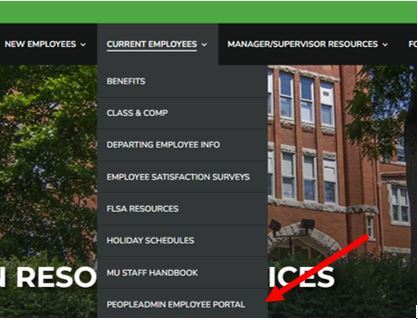
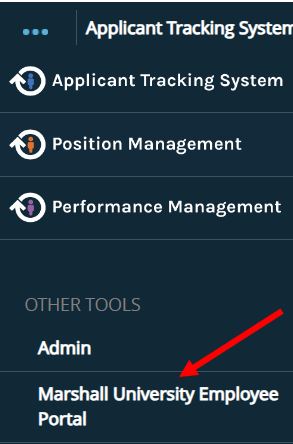
As mentioned above, you will be completing these evaluations in the Employee Portal of PeopleAdmin, not where you complete positions and job postings. You can access the portal one of three ways:
- By the direct link at https://marshall.peopleadmin.com/portal. This link is also located in the “Current Employees” menu on the HR website.
- If you are in the PeopleAdmin system, you can go to the top left menu and select the link under the “Other Tools” menu.
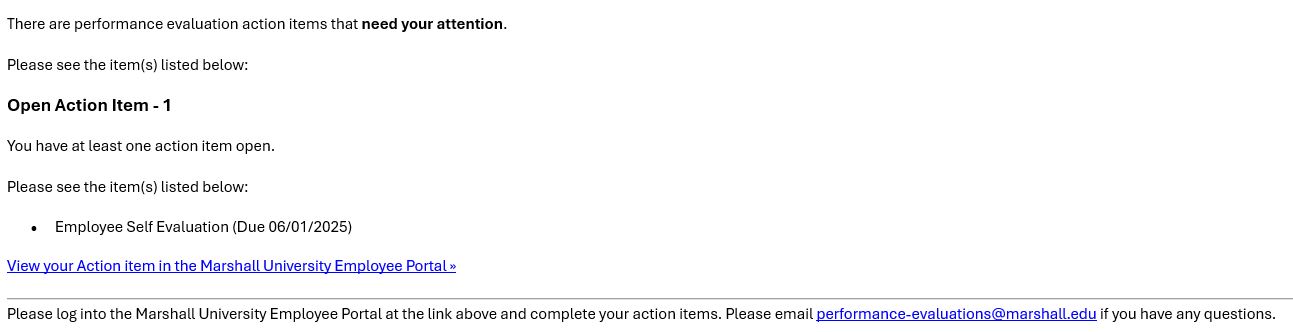
- The link will also be listed in the system generated emails employees and supervisors will receive throughout the evaluation process.
Steps in the Process
The steps to be performed will vary based on the type of assessment.
- Supervisor Sets Plan –
- Review Competencies – Discuss and review the core competences for Marshall University
- Supervisor Sets Goals – The supervisor will set performance goals for the employee for the upcoming year.
- Mid-Year Check-In – This will be a check in with employee and supervisor for the annual evaluation
- Employee Self Evaluation – This is where the employee rates themselves on their job performance
- Supervisor Evaluation – This is where the supervisor rates employee on their job performance
- Supervisor Meets with Employee – The supervisor will meet with employee to discuss evaluation.
- Employee Signs Off on Evaluation – The employee will acknowledge the evaluation and sign off.
- Supervisor Signs Off – The supervisor will acknowledge the evaluation and sign off.
- Second Level Supervisor Approves – The evaluations will need approval from the second level approver of the employee.
Schedule for 2026-2027
Step
Supervisor Sets Plan
Continuous Feedback
Mid-Year Check-In
Continuous Feedback
Employee Self Evaluation
Supervisor Evaluation
Supervisor Meets with Employee
Employee Signs Off on Evaluation
Supervisor Signs Off
Second Level Supervisor Approves
System Closes
Open Date
7/1/2026
Ongoing
11/01/2026
Ongoing
04/01/2027
04/01/2027
04/01/2027
04/01/2027
04/01/2027
04/15/2027
N/A
Due Date
8/31/2026
Ongoing
03/31/2027
Ongoing
06/01/2027
06/05/2027
06/05/2027
06/15/2027
06/15/2027
06/20/2027
06/30/2027
Prerequisite
N/A
N/A
Supervisor Sets Plan
N/A
Mid-Year Check-In
Mid-Year Check-In
Supervisor Evaluation
Supervisor Meets with Employee
Employee Signs Off on Evaluation
Supervisor Signs Off
Evaluation Marked as Canceled if Above Steps are not Complete at Time of Closing
What you will be Evaluated On and How you will be Scored
Goals
You and your supervisor will need to develop at least 3 goals for expectations of how to become successful and grow professionally during the upcoming year. These goals will be assigned to the employee by the supervisor in the first step (Supervisor Sets the Plan) and become part of both the employee’s Self Evaluation and the Supervisor Evaluation.
- Goals for probationary evaluations will be the same as before on the paper forms.
- For annual evaluations in PeopleAdmin, the supervisor will set goals for the employee for the upcoming year.
This is for salaried MURC employees.
Teamwork
- Builds strong, friendly, and supportive relationships with coworkers across the university, putting the team first and working hard to help everyone succeed.
- Encourages others to do their best by showing kindness, care, and respect, while promoting a “We Are Marshall” spirit through shared wins and losses.
- Communicates honestly and fosters a team environment where people help each other, work well together, and create a space where everyone can learn and grow.
- Listens actively, accepts feedback, and supports a culture of continuous improvement, ensuring everyone feels included and motivated to contribute.
Quality, Health, and Safety
- Arrives on time and follows all policies and procedures.
- Produces high-quality work efficiently while meeting goals and deadlines.
- Stays focused and persistent when tasks are challenging, solving problems before they escalate.
- Prioritizes safety by sharing improvement ideas, participating in safety training, and reporting any incidents or hazards immediately.
Customer Focus
- Resolves issues and supports customers, even when their needs change unexpectedly.
- Builds positive relationships with all customers—including those who may be difficult—and becomes a trusted, dependable resource.
- Communicates clearly and respectfully when requests cannot be fulfilled and seeks assistance when needed.
- Strives to exceed expectations by delivering excellent service to customers, including students, faculty, or clients.
Efficiency and Flexibility
- Continuously looks for ways to improve work processes and embraces learning new tools or tasks.
- Manages multiple responsibilities effectively and remains composed during delays or sudden changes.
- Identifies potential issues early and communicates them promptly.
- Demonstrates patience and adaptability when plans shift, supporting the team in achieving goals during busy or stressful periods.
Professional Development and Technical Knowledge
- Possesses strong job knowledge and uses technical skills to deliver outstanding results.
- Seeks opportunities to learn and stay current with the latest tools, methods, and industry updates.
- Maintains professionalism and composure when facing difficult or high-pressure situations.
- Completes all required training and keeps certifications and qualifications up to date.
Scoring
Ranges
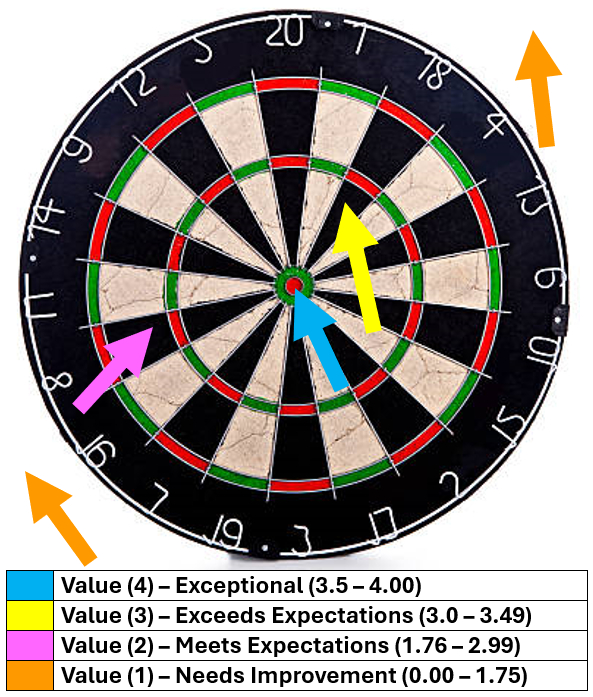
- Value (4) – Exceptional (3.5 – 4.00)
Performance far exceeded expectations due to exceptionally high quality of work; producing “game changing” results that completely changed the trajectory of the department, division, or University. - Value (3) – Exceeds Expectations (3.0 – 3.49)
Performance consistently exceeded expectations in all essential areas of responsibility, and the quality of work overall was excellent. Annual goals were met. - Value (2) – Meets Expectations (1.76 – 2.99)
Performance consistently met expectations in all essential areas of responsibility, at times possibly exceeding expectations, and the quality of work overall was very good. The most critical annual goals were met. - Value (1) – Needs Improvement (0.00 – 1.75)
Performance did not consistently meet expectations – performance failed to meet expectations in one or more essential areas of responsibility, and/or one or more of the most critical goals were not met.
Feedback Statements by Score
Score 4 – You nailed the bullseye!
- “You have exceeded expectations by fully understanding your goals and competencies. Your work has positively changed how our department/university functions.”
- “Your innovative approach and dedication have made a significant impact beyond your daily duties. Keep up the exceptional work!”
- “You consistently go above and beyond, showing leadership and initiative that benefit the entire team.”
Score 3 – Just outside the bullseye
- “You consistently take your responsibilities a step further than expected and show strong competence in your role.”
- “Your performance is very solid, and you regularly contribute more than what’s required. Keep pushing toward the bullseye!”
- “You demonstrate reliability and a proactive attitude, positioning yourself close to excellence.”
Score 2 – On the outer circle
- “You are meeting the basic goals and expectations, which is good progress.”
- “There is room for you to grow by focusing on areas that will bring you closer to exceeding expectations.”
- “With additional effort and support, you can move closer to the center of the bullseye and deliver even stronger results.”
Score 1 – Missed the board
- “Your current performance does not yet meet the expectations for your role.”
- “We want to support you in improving key areas to help you succeed.”
- “Let’s work together to create an action plan that will help you improve and hit your goals.”
Weighted Values
- 75% Competencies
- 25% Goals
Potential – Ability to grow, develop new skills, and take on future opportunities
This is a new section of the evaluation. This is a review of your potential—your ability to grow, develop new skills, and take on future opportunities within the organization.
Potential looks at things like:
- How you approach new challenges
- Your interest in growth and development
- Your ability to lead, collaborate, and influence others
- Your readiness for increased responsibility
This is not just about where you are today—it’s about where you can go next. Your potential rating helps guide development conversations and future career opportunities.
Potential Rating Levels
- High Potential – Consistently demonstrates strong capability and readiness for increased responsibility. Employees in this category show initiative, leadership qualities, and the ability to adapt quickly. They are well-positioned for advancement or expanded roles in the near future.
- Medium Potential – Demonstrates the ability to grow and take on additional responsibilities with continued development. Employees in this category show promise and may be ready for advancement over time with targeted experience, training, or support.
- Low Potential – Currently focused on developing skills within their existing role. Employees in this category may require additional time, guidance, or development to prepare for expanded responsibilities. This rating does not reflect performance, but rather current readiness for growth.
Training, Instructions, & Tips
Training
How to process evaluations in PeopleAdmin
- Watch recorded June 16th Virtual Training here.
Instructions
Best Practice: Tips and Examples
- Marco’s Performance Evaluation
- Performance Evaluations Questions to ask Employees
- Performance Evaluations Supervisor Question Guide
FAQs
To view past evaluations, supervisors and/or employees will first need to log into the Employee Portal at https://marshall.peopleadmin.com/portal.
- Supervisors to view direct reports past evaluations:
- Once in the employee portal, the supervisor will need to click on the “My Employees’ Reviews” link.
- Then on the Reviews Dashboard, you will click on the “Advanced” button on the right of the screen.
- You will then change the Program Status to “Closed”.
- You will click on the name of the evaluation you wish to view.
- Click on “Supervisor Evaluation” on the left menu.
- Employees to view their past evaluations:
- Once in the employee portal, you will need to click on the “My Reviews” link.
- You can either click on the link for the evaluation you want to view, or the blue “Actions” button and “View Review.”
- Then click on the “Supervisor Evaluation” link on the left menu.
- One thing to note, If you receive this message when clicking on the supervisor evaluation link, “The Supervisor Evaluation has not been completed and cannot be displayed at the moment,” you as the employee will not be able to view it. If your evaluation was not approved at the 8th step, contact EMAIL HERE and we can provide you a copy of your evaluation.
As mentioned above, if your employee has been at the university less than 6 Months they would be considered a probationary employee.
- We are still using paper evaluation forms located on the HR Forms site, but will be converting to a Dynamic Form in the upcoming months.
- You will complete their evaluations at the end of the month following their first work date anniversary in Banner. (ex. If your employee was hired 4/1/2026, their 3-month evaluation would be due July 1st and their 6 month evaluation would be due October 1st).
If your first work date in Banner is after December 31st, you will not be included in this years evaluations. Your evaluation will need to be processed on paper.
If your employee is on paid leave, you as the supervisor will need to begin the evaluation process as normal (supervisor sets the plan). If the employee returns to work, you will complete the evaluation. If the employee does not return to work the supervisor will not complete the evaluation and allow the system to close. HR will know the employee is on leave and there is not enough information to provide a sufficient rating.
If your employee is still active by June 5th, you still need to provide an evaluation.
If your employee left MURC and has now returned, they would be considered a new employee. This means that they would not do their evaluation in PeopleAdmin. They would need to be completed on paper until the next evaluation cycle.
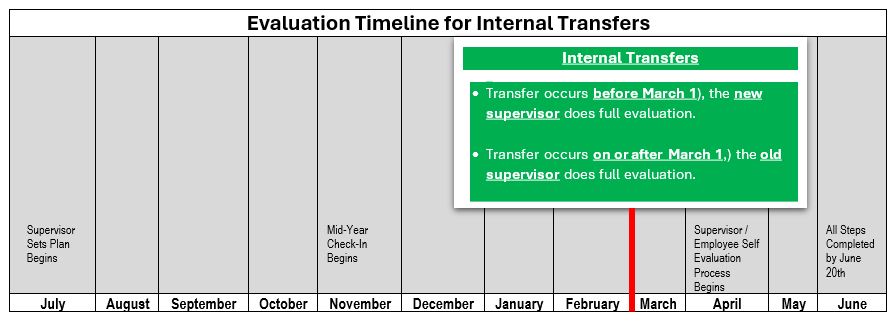
When an employee transfers to a new position within MURC, their “user profile” in the performance management module (orange screen) transfers to the new supervisor. It is not possible to “split” the employee’s performance actions to allow the previous manager to complete the evaluation, AND allow the new supervisor to contribute. As a result:
- If an employee transfers positions before March 1st (before the red line), the new supervisor will complete the evaluation.
- If an employee transfers positions on or after March, the old supervisor must complete the evaluation (i.e. all 8 steps) before the employee transfers to their new position.
To reopen step 1 to begin the evaluation as a transfer, email MURC-performance-management@marshall.edu. You as the supervisor will need to work with the employee to determine appropriate goals for the evaluation. You can also keep previous goals listed, add to them, or remove and add new.
Please see the scoring language above.
Step 6 in the evaluation process is “Employee Signs Off on Evaluation”. This is where you “acknowledge” that you and your supervisor have met and discussed the evaluation. You can make a comment in the box such as
- I have reviewed my evaluation with my supervisor, and I do not agree with this performance assessment.
PLEASE NOTE: Selecting the “acknowledge” button does not mean you agree with the evaluation of your work performance. Disagreement may be documented in the comments field. You can then contact your departmental Director or VP to discuss further.
Please complete the Banner Employee Data Corrections Request Form and select the update supervisor option.
Yes. Throughout the evaluation steps, there is a feature called Progress Notes. This allows you to add notes and attachments and store within the system. This is located in the top toolbar of the employee portal.
Yes. In the instructions, there will be documentation that explains how to print an evaluation.
Email MURC-performance-management@marshall.edu and a MURC staff will be a happy to assist.