Marshall University uses PeopleAdmin as the system for job postings and applicant tracking as well as position management. Below are guides and instructions on how to use the system.
- How to Create/Modify Positions (Position Management Orange Screen)
- How to Create/Modify Job Postings (Applicant Tracking Blue Screen)
- How to Approve your Processes
- Search Committees
- Performance Management
How to begin using the system
- How to Apply for Jobs – To apply for jobs in PeopleAdmin, you must first have an account. Once you have created your account, you can begin applying for a job.
- How to Begin using the System – You must have an Employee Profile (Role). If your role is not correct, you will not be able to access the
 information you need.
 - Custom Search – How to set up custom search. You can also export the results of this view into a Report.
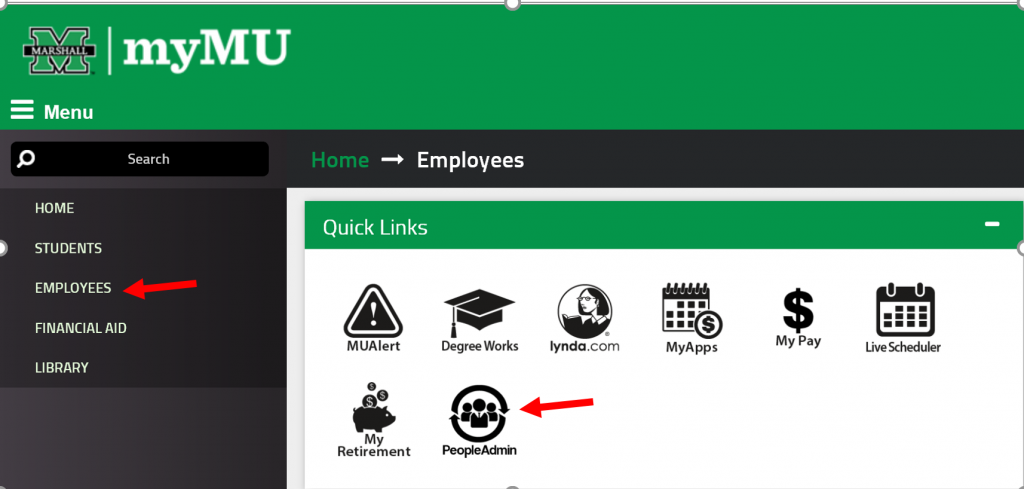
- Log In – You will log in through MyMU. You will select the Employees option of the menu on the right. You will then have the PeopleAdmin image under the Quick Links menu.
- Navigation – PeopleAdmin has a new interface and navigation has changed. We have instructions on how to navigate through the new system.
- How the System Works – To see the workflow in a visual/diagram format
 information you need.
- FAQs for using PeopleAdmin for Faculty and Staff.
How to Create/Modify Faculty and Staff Positions (Orange Screen)
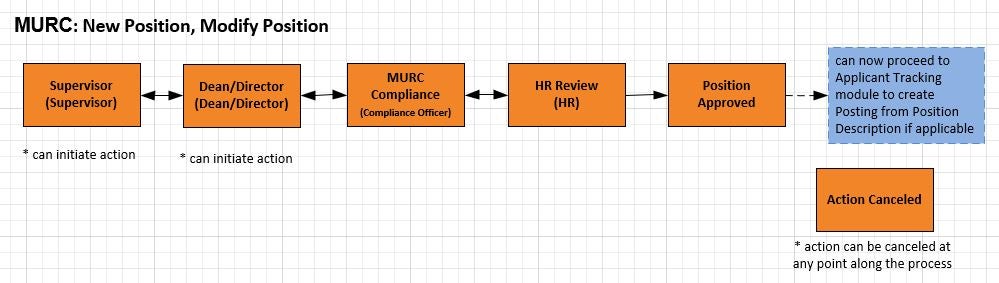
Before posting a position in the Applicant Tracking Module (blue), you must first initiate the process in the Position Management Module (orange) to review and confirm that all position details are accurate and to make any necessary updates. Completing this step will also initiate the approval workflow for the position. This requirement does not apply to Graduate Assistants.
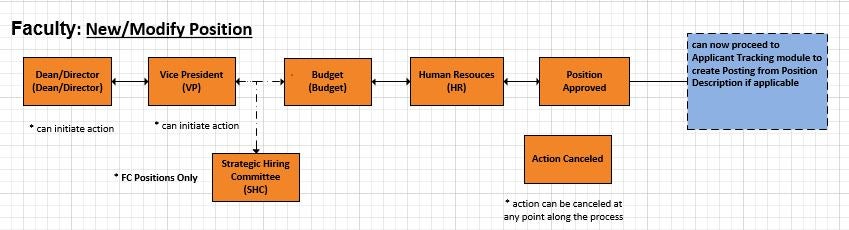
Faculty Position Description Workflow
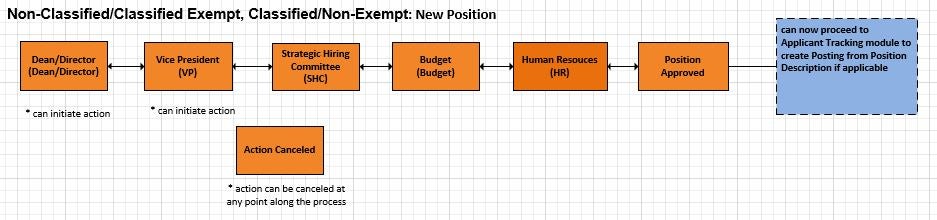
Staff New Position Description Workflow
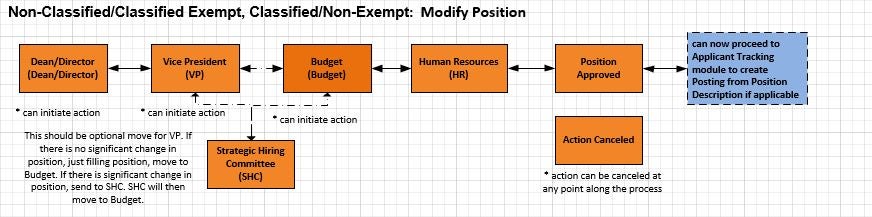
Staff Position Modification Description Workflow
MURC Position Description Workflow
Guide to the changes of position approval with the online SHC and IBM approvals. REVISED!
These instructions are to update the position in preparation for performance evaluations.
This Search Process Guide are the complete instructions for creating/modifying positions through completing the new hire paperwork.
If you have a new position to post, you must first create the position description in PeopleAdmin
If you have a new position to post, you must first create the position description in PeopleAdmin. REVISED!
If you already have an existing position but need to make changes, you will simply modify the position description in PeopleAdmin.
How to Create/Modify Faculty and Staff Postings (Blue Screen)
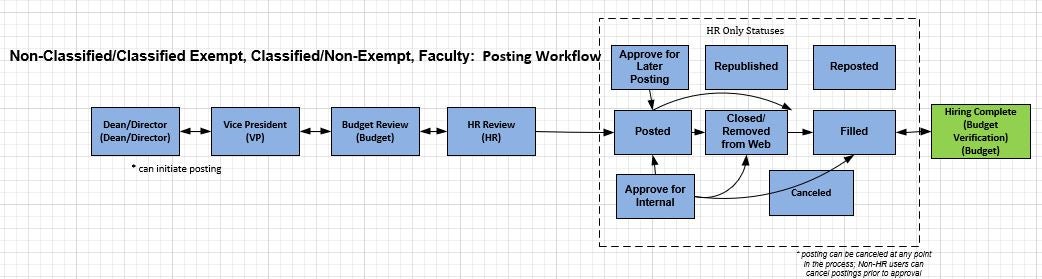
Now that your position has been created or modified, you are now ready to create a job posting in the Applicant Tracking (Hire) Module. (this excludes Graduate Assistants)
Faculty and Staff Posting Workflow

This Search Process Guide are the complete instructions for creating/modifying positions through completing the new hire paperwork.
Once you have created/modified your position in PeopleAdmin, you are now ready to create your job posting.
Supplemental questions are a method of gathering additional, job-specific information to assist the search committee in identifying candidates to move forward in the applicant process. This guide can help you with choosing the correct questions for your posting.
How to Approve Your Processes
An important part of the PeopleAdmin position and posting process is the approval. Employees who have been designated as an an approver must take action for the process to be complete.
As an approver, you must take action on a new position or one that has been modified.
You must also take action on a job posting.
Search Committees
Search committees play a vital role in recruiting, evaluating, and recommending the most qualified candidates for employment by the University. Please view our search committee page for training, best practices, and other information.
How Search Committee Chairs access and select applicants.
How to Search Committee Members access applications.
Graduate Assistants
The PeopleAdmin process for a Graduate Assistant is different than Faculty and Staff. Graduate assistant positions are not stored in the Position Management (Positions) Module. You will post the position and complete the Hiring Proposal.
Instructions for how to create a job posting for a graduate assistant.
Since you have selected the GA you want to hire, you will now process their hiring proposal.
For complete updates, please see our list of Frequently Asked Questions (FAQs).